Zone-based firewall
Functional description
The zone-based firewall enables precise control of network traffic between different logical network areas (zones). Each zone represents a clearly defined network area with a specific function.

By defining policies between source and destination zones, traffic can be selectively allowed or blocked. This increases security by preventing unnecessary or risky communication paths. In the default configuration, traffic between all zones is permitted in both directions, so that all HOOC functions are available without restriction.
The firewall only checks and filters network traffic that takes place between different zones. Traffic within the same zone is not checked or restricted by the firewall, with the exception of traffic from the HOOC user zone.
Operating principle
By changing the default policies or adding zone policies, traffic can be made more restrictive.
Rules are sorted from specific to non-specific and processed accordingly.
Zones
Zones define the logical network areas. Each zone has a defined zone-Id, zone type, zone name, network group, VLAN-type, VLAN, network participants, and DHCP settings. Additional zones can be added at any time.
Available zone types and network groups
| Zone type | Description | Network participants | Available network groups |
|---|---|---|---|
| Remote Network | Represents the local device network behind the HOOC gateway | IP subnet, Hardware addresses (MAC) | LAN, SEP0, SEP1, OPT0 |
| Network Services | Internal HOOC services (remote control, secure proxy, virtual DHCP) | IP subnet, Hardware addresses (MAC) | LAN |
| CrossLink | Networks of other systems connected via CrossLink | IP subnet, Hardware addresses (MAC) | LAN, SEP0, SEP1, OPT0 |
| HOOC Users | Remote users via HOOC Client and Compact app | Zone allocation for supporters and site users | LAN, SEP0, SEP1, OPT0 |
Zone guidelines
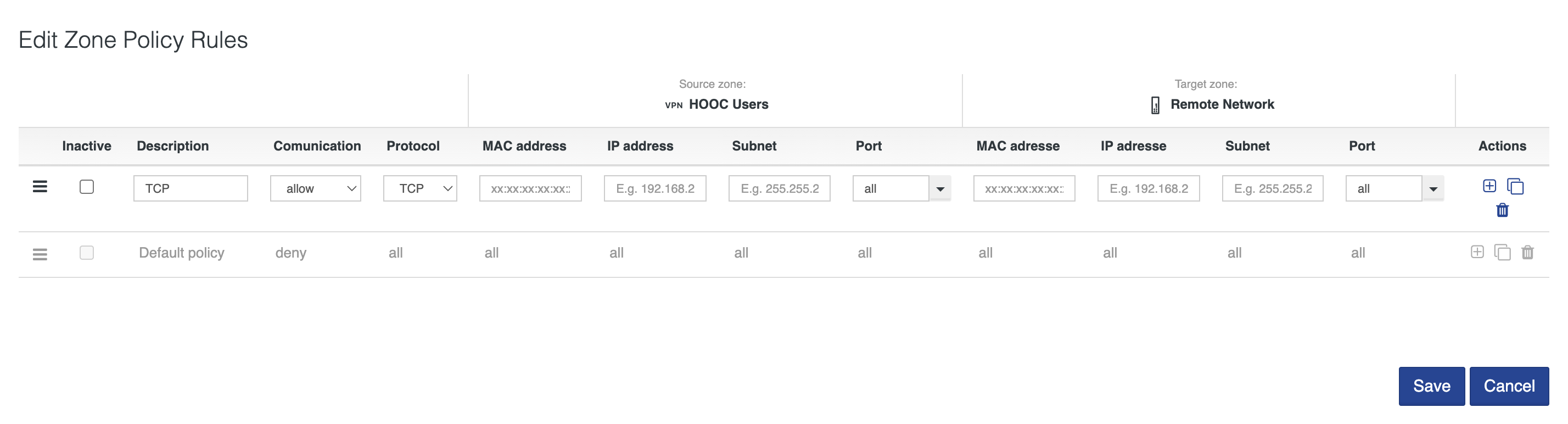
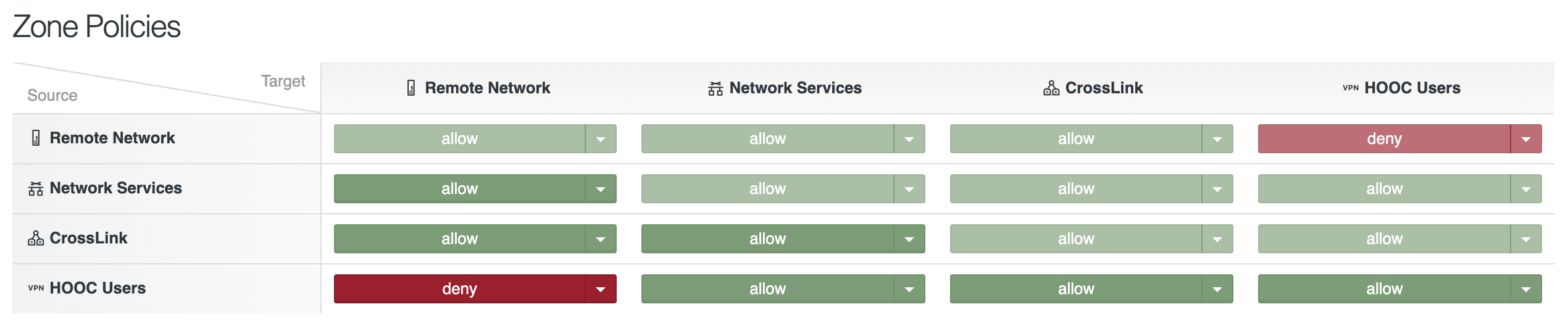
The zone policy matrix shows all source/destination zone pairs. Each cell defines the default action (“allow” or “deny”) for that specific direction. Clicking on a cell changes the default action. All traffic in this direction is then blocked. In addition, individual zone policies can be set that specify the protocol and source and destination information for MAC address, IP address, subnet mask, and port.
Connection logs
The connection logs show an overview of recently terminated connections by users in the HOOC Users zone (client and compact app). Active connections can be viewed under Network → Firewall → Remote Access.
The logs are displayed at the system level under Network → Firewall → Connection logs and contain the following information:
| Column | Description |
|---|---|
| Zone ID | Internal ID of the affected zone |
| Zone name | Name of the zone |
| User | Display name and email address of the connected user |
| User type | Type of user account (Supporter, Site user, Reseller) |
| Connection start | Date and time when the connection began |
| Connection duration | Duration of the connection (format: hh:mm:ss) |
| Incoming traffic | Amount of data sent by the user (upload from the user’s perspective) |
| Outgoing traffic | Amount of data received by the user (download from the user’s perspective) |
| Action | User information |
Important information
- The connection logs only connections from the HOOC User zone.
- Connections within other zones (e.g., Remote Network ↔ CrossLink) do not appear here.
- The traffic values displayed refer to the period of the respective connection session.
- Multiple entries with the same zone ID and user usually indicate consecutive connections (e.g., after changing Wi-Fi, restarting the app, or timeout).
The logs are primarily used for diagnosing connection problems, tracking support calls, and providing a rough assessment of remote access behavior.
Management of network participants
Network participants can be assigned to a HOOC User zone under User Management → Site users or User Management → Supporter. If the zone is deleted, the assigned users will lose access.
Overview of zone allocation
A clear overview of zone allocation can be viewed under Network → Firewall → Remote Access.
This includes zone ID, zone name, user, and user type.
Recommendations
For increased security, restrictive settings are recommended:
- HOOC User → Remote Network: Allow only necessary ports/protocols.
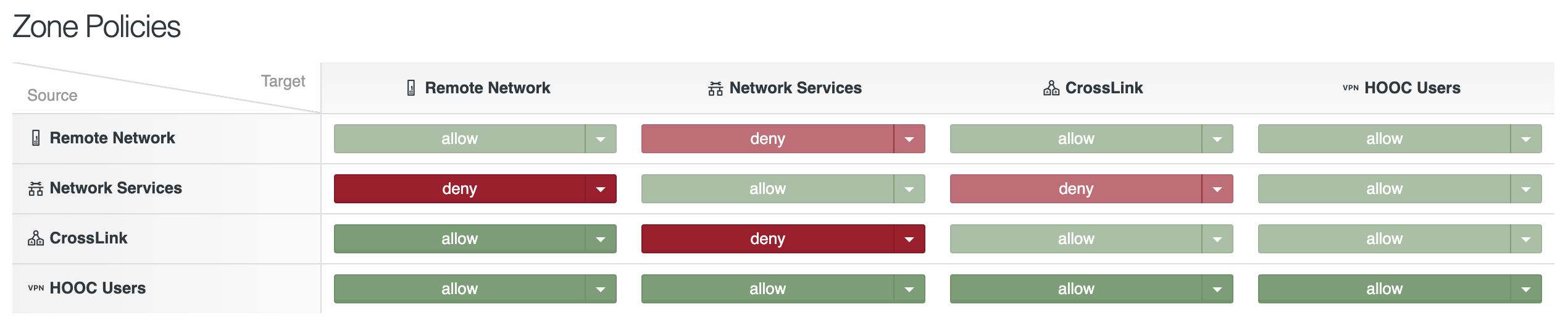
- Block Remote Network → Network Services to prevent access to internal services from the Remote Network.
- Test after making changes, as incorrect configurations can interrupt remote access.
configuration
The zone-based firewall can be configured under Network → Firewall. If no explicit rules are defined, no filtering will be applied.
Typical use cases are:
- Restricting HOOC User access (HOOC Client and Compact app) to specific end devices in the Remote Network.
- Protection of internal HOOC services (e.g., Secure Proxy, Remote Control) against unauthorized access from Remote Network or CrossLink.
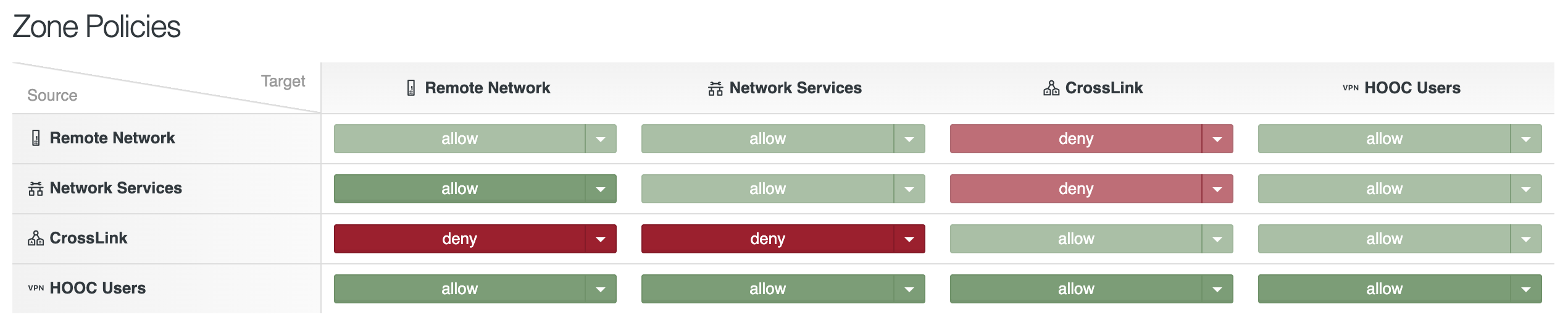
- Restriction of traffic between locations connected via CrossLink.
- Targeted release of protocols or ports between users and the location.