Security Guidelines
System overview
The HOOC gateway (HOOC Connect) is used to set up an encrypted VPN connection between a site (remote network infrastructure) and the HOOC Cloud. A separate, virtual, and completely isolated network is then created for each facility in the HOOC Cloud.
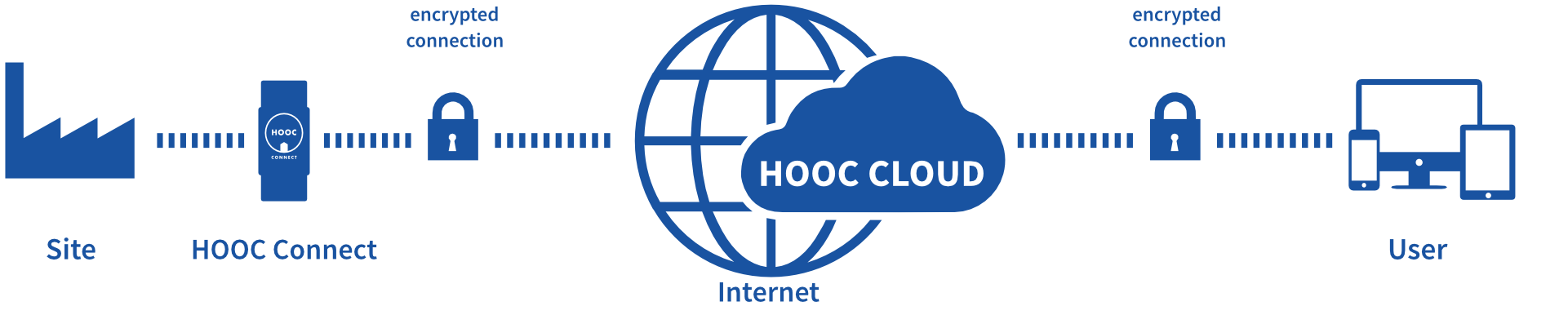
The HOOC app uses Secure Remote Access to establish an encrypted VPN connection to the HOOC Cloud and the corresponding virtual network in the same way. Once the connections have been established, a “virtual network cable” (Ethernet, Layer 2) is created between the system and the HOOC app. All protocols provided in the system’s network can be used accordingly when using the HOOC solution. Other applications provided in the HOOC Cloud, such as Secure Proxy, are based on the same principle.
Safety parameters
This section describes the available functions and interfaces. In particular, it documents all safety parameters that are under the control of the user. Safe values and recommendations are provided.
Compliant operation of HOOC gateways
The standard configuration supplied with the HOOC gateways guarantees fast and smooth commissioning. However, some parameters of the standard configuration do not comply with the IEC 62443-4-2 standard. To ensure compliance, the following precautions are mandatory after commissioning:
- It is essential that all HOOC gateways are equipped with the latest firmware, which is available in the HOOC ManagementPortal. Hence, you want to ensure that all firmware files are signed and verified before installing them.
- The following adjustments are to be realized in the Security menu of the HOOC gateway:
- Deactivate the Reset button enabled option. The functions of the reset button (activate configuration mode, restart device, or reset to factory settings) will then no longer be physically available on the device. These actions are now only available from the HOOC Cloud.
- Disable the Local configuration option. The HOOC gateway can no longer be configured locally. Configuration is now exclusively possible via the HOOC Cloud.
- Deactivate the WiFi button enabled option. It will then no longer be possible to switch the WiFi access point on and off by pressing the device’s WiFi button. The action is now exclusively available from the HOOC Cloud.
- Deactivate all options in the section Internet access from LAN in the menu Internet+ -> Routing.
- Deactivate the WiFi access point of the HOOC gateway in the menu Network+ -> WiFi Access Point by setting the option WiFi Access Point activated to disabled.
- It is mandatory that the measures listed in the defense-in-depth concept for the levels perimeter security and network security are fully implemented by the installation environment.
Available functions and interfaces
The HOOC system provides several security-related functions and interfaces that are under the control of the user or integrator. These enable secure configuration, monitoring, and maintenance of the solution.
| Component / Interface | Description | Safety parameters / Options |
|---|---|---|
| HOOC ManagementPortal | Web-based administration interface for resellers, customers, and support staff. Access via HTTPS. | User management (RBAC), password rules, 2FA, rights assignment, log display |
| HOOC gateway webinterface | Local configuration interface of the HOOC gateway. Only accessible after physical activation or via the HOOC Cloud. | Activation button for access, Internet access from LAN (can be activated/deactivated) |
| VPN tunnel (Secure Remote Access) | Encrypted Layer 2 connection between gateway, cloud, and app. | Automatically managed keys, no user configuration required/possible |
| Secure Proxy / Cloud services | Services that enable access to facility resources. | Access control via labels and user rights |
| HOOC app | Mobile or desktop apps for end users with VPN functionality. | Enable/disable use of user certificate and 2FA, local password storage |
| API (REST / MQTT) | Interfaces for integrators for automation and data integration. | Access only with valid token and TLS, rights controlled via labels |
| Firmware update system | Provision of verified firmware images. | Only signed firmware, update via ManagementPortal, integrity check during loading |
| Logging & monitoring | Central recording of security-related events. | Visible in the ManagementPortal, optional export for audits |
Passwords
Default passwords
None of the components used in the HOOC solution have default passwords. Each user sets their own password when creating an account.
Minimum length and complexity
Before passwords are accepted, their strength is evaluated using a series of positive and negative criteria. The evaluation yields a value between 0 and 100. A password must have a strength of at least 80.
To create a strong password, the following requirements must be met:
- Minimum length of 8 characters
- Combination of upper and lower case letters, numbers, and special characters
- No simple patterns such as abc, 123, !!! or repetitions such as aaa
- Inclusion of numbers and special characters in the middle of the password
- Must not consist of letters or numbers only
Expiration time
Passwords do not have a defined validity period. However, it is recommended to change your password regularly if two-factor authentication (2FA) is not used or if there is any suspicion of compromise.
Access control
Maximum login attempts
Please note that after 15 failed login attempts within two minutes, the account will be temporarily locked for one hour.
Role-based access control (RBAC/ACL)
Permissions are strictly assigned according to account type and defined role (reseller, customer, supporter, system user). Users are only granted the rights they need to perform their tasks (least privilege principle).
Network security
Allowed ports
The HOOC gateway uses only encrypted connections (HTTPS and VPN). No unencrypted ports, protocols or external services outside the HOOC Cloud are required for its operation.
Firewall recommendations
Incoming and outgoing network traffic should be restricted in accordance with the documented minimum requirements.
Encryption
Transport encryption
Communication between the HOOC gateway, HOOC Cloud, and HOOC apps takes place exclusively via TLS 1.2 or higher with modern cipher suites.
Data integrity
Digital signatures ensure that firmware and configuration files are unchanged and authentic.
Key protection
Device keys are generated once during production, stored securely in the hardware, and are not accessible to third parties. The device key is used to authenticate the device and to verify the authenticity of the software.
Security logs
During compliant operation of the HOOC gateway, the HOOC Cloud logs security-related events for traceability and error analysis. Logging is carried out in accordance with data protection regulations and is limited to security-critical processes. This includes:
- Configuration changes
- Start and end of VPN sessions
The logs can be viewed and evaluated via the HOOC ManagementPortal. Integrators should check log data regularly and archive it securely.
For access to log files, you can contact HOOC Support at info@hooc.ch. To provide the log files, the serial number, the site data id, and the email address of the requesting account are required.
Best practices
To ensure the IT security and operational reliability of the HOOC solution, the following best practices are recommended:
Password management
- Use a unique password for each account that is not used for other services.
- Do not share accounts or passwords with any other users.
- Never store passwords in plain text or in unsecured files.
- If possible, use a password manager with secure encryption.
- Change passwords if misuse is suspected.
- Deactivate the accounts of employees who have left the company.
Two-factor authentication (2FA)
- Enable 2FA for all users with administrative rights.
- 2FA should be enforced for all access via the HOOC ManagementPortal.
System maintenance
- Install firmware and security updates regularly.
- Only use official HOOC sources for updates.
- Perform functional tests after updates.
Network and access security
- Place the gateway in a separate, protected network segment (e.g., DMZ).
- Restrict network access to authorized devices and known IP addresses. You can find the IP addresses of the HOOC solution in the HOOC ManagementPortal.
- Disable unused services and interfaces.
- Use firewalls, intrusion detection systems (IDS), and monitoring tools, if available.
Backup and restore
- Make regular backups of the gateway configuration and store them securely.
- Backups are encrypted and password-protected. The key for the AES-256-GCM is derived from the password using PBKDF2.
- Use a strong password.
- Test restore procedures periodically.
Defense-in-Depth
Defense in depth refers to a security concept in which several independent protective measures are used to secure a system. The aim is to ward off attacks even if a single protective measure fails. Instead of relying on a single security barrier (e.g., a password or firewall), different levels are combined:
- Perimeter security encompasses defense systems around networks or components that prevent the intrusion of external threats.
- Network security encompasses the protection of network infrastructure and the data transported within it.
- Application encompasses all means, measures, technologies, or concepts that serve to protect applications.
- Host security encompasses precautions, means, and measures for protecting the systems on which applications and services are executed.
- Data security refers to the protection of data against unauthorized access, manipulation, and loss.
Each layer contributes to minimizing risks and enhancing the overall resilience of the system.

Perimeter Security
The following measures, technologies, and concepts related to perimeter security are recommended and must be provided and implemented as such by the environment in which the HOOC gateway is installed:
- Physical access to the HOOC gateway must be controlled by external access systems.
- External protection of the HOOC gateway on the WAN side through rate limiting, DDoS prevention, and/or intrusion detection is recommended.
- The HOOC gateway should preferably be used in segmented networks (e.g., DMZ).
Network Security
Network security is ensured through the use of the VPN tunnel and the fully encrypted communication between the HOOC gateway and the HOOC Cloud. Data traffic to destinations outside the HOOC Cloud can be enabled or disabled in the HOOC gateway using the Internet access from LAN option. From a network security perspective, it is recommended to disable this option.
To further improve network security, the following measures and concepts are recommended, which must be provided by the installation environment:
- When used in external networks, protection by firewalls is recommended to limit data traffic between HOOC gateways and the HOOC Cloud to the most necessary IPs and ports. You can find the IP addresses and ports of the HOOC solution in the HOOC ManagementPortal.
- The use of segmented networks on the LAN side of the HOOC gateway is recommended.
Application Security
To ensure application security, the following measures, technologies, and concepts are provided for the HOOC gateway and its interaction with the HOOC Cloud and users:
- Authentication and authorization for VPN and configuration APIs are based on cryptographic keys that are generated and stored specifically for each device.
- Access to the configuration page of the HOOC gateway must first be activated by pressing a button on the device. This requires physical access, which must be controlled by the installation environment.
- When accessing the configuration page of the HOOC gateway via the HOOC Cloud, in addition to a username and password, the use of Two-factor authentication (2FA) is possible and recommended for user authentication and authorization.
- Data entries via all web interfaces and APIs are validated and cleaned up to prevent invalid or malicious input that could impair the operation of the HOOC gateway or HOOC Cloud.
- All APIs and web interfaces have mechanisms in place to prevent threats from the categories XSS, XXE injection, and SSRF.
- The application of new configurations to HOOC gateways always takes place in two steps:
- Temporary application: The new configuration is only applied for a limited period of time. If the gateway is no longer accessible due to the new configuration, the original configuration is restored at the end of the predefined period. This allows the HOOC gateway to continue operating in the last known and working configuration.
- Permanent application of the configuration: Once the configuration has been tested and found to be functional, it must either be confirmed and applied or reversed. Only after confirmed application does the new configuration take effect permanently.
- Process data is free of sensitive data such as passwords.
Host Security
To ensure a high level of security at the system level (host security), the following measures and technologies are used in HOOC gateways:
- The operating system is completely recompiled for each new firmware image. This ensures that there are no outdated components (kernel, packages, etc.) in the firmware. Complete recompilation also creates a controlled and reproducible system environment.
- The firmware images provided always contain the latest OS patches. Security-related updates to the underlying operating system are integrated promptly in order to close known vulnerabilities and thus minimize potential attack surfaces.
- The firmware images contain only the minimum required OS packages and hardened configurations. By reducing the system to the bare essentials, the risk of attacks on unnecessary or unused services is minimized. In addition, security-relevant system parameters (e.g., file system rights, network services) are configured with hardened, security-optimized parameters.
- The HOOC daemon is recompiled and delivered with the latest runtime patches. The central application component is also regularly updated and recompiled to close security gaps in the runtime environment and libraries.
- The use of read-only file systems combined with overlay file systems guarantees the integrity of the installed firmware. The base system is write-protected, which prevents manipulation or unintentional changes. This increases system stability and prevents persistent attacks.
Data Security
The protection of sensitive data (data security) is a top priority for the HOOC solution. To ensure the confidentiality, integrity, and availability of configuration and process data, specific technical measures and security concepts are implemented. These form an integral part of the system architecture. The following applies to HOOC gateways:
- Configuration data generated during hardware provisioning is stored in obfuscated form in the hardware and cannot be exported or modified. This measure protects sensitive system information from unauthorized access and manipulation.
- Firmware is provided exclusively with signatures. Cryptographic signatures, which are automatically verified during installation, ensure that only authentic and unaltered firmware is installed. This prevents, for example, the installation of manipulated images that contain malware. Regardless of this, end users can verify the integrity of firmware images themselves and independently.
- End users can check the checksum of a firmware image locally before installation. To do this, the provided SHA-256 checksum is compared with the locally calculated checksum. The firmware may only be installed if both values match exactly.
SHA256 checksum verification:
- Windows:
certutil -hashfile [file] SHA256 - Linux:
sha256sum [file] - macOS:
shasum -a 256 [file]The hash output must match the value published in the HOOC ManagementPortal exactly. If the checksum does not match, the firmware must not be installed.
- Windows:
- So-called magic numbers ensure that only firmware images intended for specific hardware can be installed. These unique identifiers prevent incorrect or incompatible firmware from being installed on a device.
- To ensure the confidentiality and integrity of sensitive operating data, the transfer of process data to the cloud is exclusively encrypted. This protects the data from unauthorized access during transmission over public or unsecure networks.
- Process data is not stored permanently, but remains exclusively in the temporary working memory of the devices. This ensures that no sensitive data remains on the device after a restart or power failure, minimizing the risk of data leakage.
Measures of the defense-in-depth concept that can be expected from the environment
The measures listed in the defense-in-depth concept for the layers perimeter security and network security must be provided by the installation environment.
Hardening IT security
The following measures are recommended to ensure the secure integration of the HOOC solution into an existing IT environment:
Installation and integration
- The HOOC gateway must only be installed in trusted and monitored networks.
- Use separate network segments for control, corporate, and Internet traffic.
- The gateway’s power supply should be protected by an uninterruptible power supply (UPS).
- Only enable Internet access from LAN if absolutely necessary.
Rights and roles
- Administrator rights are reserved exclusively for trained personnel.
- Accounts with administrative rights must be protected with MFA.
- Supporter access should be temporary and only activated after approval by the administrator.
Configuration and maintenance
- After the initial installation, the device must be registered and uniquely assigned in the HOOC ManagementPortal.
- Check the VPN status after every change to the firewall, network, or firmware.
- Disable unused interfaces (e.g., USB, serial ports) if possible.
- Ensure that all firmware files are signed and verified before installation.
Reporting security incidents
- Security incidents, unauthorized access, or suspected manipulation must be reported immediately to the responsible administrator or HOOC support.
- Record the time, affected systems, and observed symptoms in writing.
- If possible, disconnect affected devices from the network to limit damage.
Reporting security-related issues
If you encounter security-related issues with the HOOC solution, you can contact us by email at security@hooc.ch. In order to investigate the incident efficiently, the following information is required:
- A description of the vulnerability
- Detailed information on how to reproduce the problem (procedures, screenshots, log extracts)
- The applicant’s contact details
Upon receipt, HOOC automatically confirms receipt by email, creates a ticket, and simultaneously informs the HOOC Security Team. This ticket is then processed by the HOOC Security Team. The applicant will be informed of the next steps once the security-related issue has been investigated.
After security issues have been assessed, the following periods apply for their disclosure and resolution:
| Assessment | Disclosure | Resolution |
|---|---|---|
| Low | within 6 months | within 6 months |
| Medium | within 30 days | within 30 days |
| High | within 14 days | within 14 days |
Safe disposal
If a HOOC gateway is uninstalled and implemented in another environment, the device must be reset to factory settings and all supporters, system users, and services must be removed from the HOOC Cloud. This ensures that no old data remains and unauthorized access is prevented. The device can then be considered as good as new.
For the secure decommissioning of a HOOC gateway, the device must be returned to HOOC AG in addition to the actions described above. The internal flash memory contains data such as authentication keys between the HOOC gateway and the HOOC Cloud, which cannot be reliably deleted by users. The device must be returned to HOOC AG in order to ensure that no old data remains and unauthorized access can be prevented.
Secure operation
This policy describes the security-related requirements and rules of conduct for the use of the HOOC solution by users (supporters and system users) and administrators (resellers). The aim is to ensure the integrity, availability, and confidentiality of the systems and data. Cooperation between users and administrators is essential for protecting the infrastructure.
Guidelines for administrators
Resellers are responsible for the secure configuration, maintenance, and monitoring of HOOC gateways as well as the work performed in the HOOC ManagementPortal. The following measures are mandatory:
- Each user receives an individual account with specific rights. The use of group addresses or shared accounts is not permitted.
- Two-factor authentication (2FA) is mandatory for all administrative accounts.
- Regular verification of the physical security of the gateways and network components (e.g., access protection, tamper resistance) is required.
- Implementation of security updates:
- Updates must only be obtained via the HOOC ManagementPortal.
- Before installation, the signature or checksum of the update must be verified for authenticity.
- Installation must follow the technical specifications for the delivery of the security update and should ideally be performed outside of operating hours.
- Rebooting the HOOC gateway is mandatory after installing an update.
- The currently installed firmware version appears on the status page of the gateway and in the HOOC Management Portal.
- Regular training of users on security-related topics, in particular on the use of VPN access must be organized.
- Documentation of all security-related changes (e.g., user rights, network configuration, firmware updates) must be maintained.
Guidelines for users
Users of the HOOC solution are required to comply with the following security requirements:
- Compliance with the organization’s IT security guidelines, especially when dealing with network access, mobile devices, and cloud services.
- Passwords and credentials must not be shared or stored insecurely.
- Suspicious activities relating to cybersecurity, potential security breaches, or the loss of access data must be reported immediately to the responsible administrator.
- Activation of two-factor authentication (2FA), if required by the administrator.
- Installation or configuration of gateways or services must only be performed with the administrator’s approval.
User account management
Overview of user accounts
The HOOC ManagementPortal offers structured user management with different account types, each with different areas of application and permissions.
| Account type | Description | User type | Access rights |
|---|---|---|---|
| Reseller | Main account with admin rights, used to centrally manage customers, systems, and sites. | For system integrators or providers | Full access (standard) or restricted access to all customers and systems (ManagementPortal and ClientApp) |
| Customer | Sub-account (of the reseller account), used to manage multiple company systems and sites. | For companies or organizations with multiple sites/systems | Full access to all sites/systems of the company or organization (ManagementPortal and ClientApp) |
| Supporter | Additional account, added either to a reseller, customer or site (or all of them), in order to provide regular or temporary support. | For technical staff, external service providers, or third parties | Restricted access: Individual user rights (admin/read/write) are assigned based on each person’s role (ManagementPortal and ClientApp) |
| Site user | User account to manage one’s own site(s) via the app. | For end users | Restricted Access: Site management via the HOOC CompactApp, but no rights in the ManagementPortal. |
A reseller account is the main account with comprehensive administrator rights. It is used for the central management of customers and systems. This type of account is typically intended for system integrators or providers.
A customer account is a sub-account of a reseller and is used to group systems, e.g., for a specific customer. This account type is suitable for organizations with multiple installations.
The system is not a user account type in the traditional sense. It represents a single installation that includes a gateway and associated services. It represents a specific location or system.
In addition, there are supporter accounts, which are intended for technical support. These users receive individually assigned rights at the reseller, customer, or system level, for example as administrators with read/write rights or with read-only rights.
Finally, there are system users who can access services via the HOOC CompactApp but do not have rights in the ManagementPortal. They are designed for end users with restricted access rights. To control access for system users, HOOC uses a role-based system with so-called labels, which function as access control lists (ACLs). Labels define which users have read or write rights to certain services and their elements. Rights can be assigned with fine granularity, for example to alarm rules, data points, etc.
The general permissions and restrictions depend on the respective level. Resellers have full access to all customers and their systems by default, but can be restricted by deactivated admin rights. Customers have access to their own systems, but no access to the reseller level. Supporters receive individually defined rights and can only access the level assigned to them. System users, in turn, have access exclusively via the CompactApp and only to the services assigned to them.
Recommendations
Rules stored in the HOOC ManagementPortal guarantee strong passwords for all account types. As an additional protection mechanism and for enhanced security, the activation and use of two-factor authentication (2FA) is recommended.
Sharing or disclosing passwords poses a high security risk. The account types in the HOOC ManagementPortal are designed accordingly to prevent this. It is recommended that reseller accounts be registered with a general and permanent email address associated with the integrator’s company. Access to the reseller account for integrator employees must be provided through supporter accounts. It is recommended that access for support staff be restricted as much as possible and that two-factor authentication (2FA) be required.
After completing work in the HOOC ManagementPortal and on the configuration pages of the HOOC gateway, it is always recommended to explicitly close the session.